Volver a proyectos 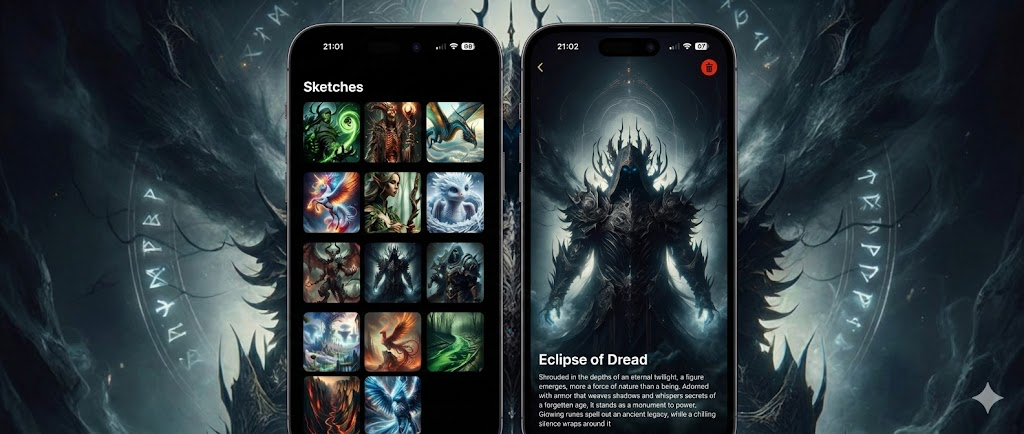
Mobile
Sketchgallery
SwiftUI - MVVM - SwiftData || Manage your sketch collection
Swift
🎨 SketchGallery
Description
SketchGallery is a SwiftUI-based application that allows users to create, edit, and manage their own sketch collections. The app provides a seamless way to store sketches with titles and descriptions, offering a visual and creative platform to organize and showcase ideas.
Data persistence is handled using SwiftData, ensuring that all sketches are saved locally for offline access.
🛠️ Technologies Used
- SwiftUI
- SwiftData
- MVVM
🚀 Features
- Sketch Collection: View all your sketches in a grid layout, each one displaying its associated image.
- Add and Edit Sketches: Easily add new sketches with titles, descriptions, and images. You can also edit or delete existing sketches.
- Sketch Details: Tap on any sketch to view its details, including the image, title, and description.
- Local Image Storage: Sketch images are stored locally on your device.
- Adaptive UI: The app adapts to both light and dark modes based on your system preferences.
📂 Project Structure
- App
SketchGalleryApp.swift: Application entry point.
- Onboarding
OnboardingView.swift: Initial view that introduces new users to the app.OnboardingViewDetails.swift: Displays specific details during the onboarding process.
- Gallery
GalleryView.swift: Main list of sketches displayed in a grid format.GalleryDetailView.swift: Shows the details of a selected sketch from the main gallery.
- Edit
EditSketchView.swift: Allows users to add, edit, or delete sketches.
- Model
Sketch.swift: The SwiftData model that represents a sketch, including attributes for title, description, date, and image name.
- Helpers
ImageHelper.swift: Functions to load and store images in local storage.TextHelper.swift: Utility functions for processing and handling text.
📸 Screenshots